Wednesday, 13 April 2011

Final Products

The Final Products

The 5 Minute Excerpt of My Documentary


Ancillary Text - Radio Advert For 18 And Driving

Southend Radio 105.1 - Playing 18 And Driving Advert


Ancillary Text - Double Page Listing Spread

Sunday, 10 April 2011

Interview on BBC Essex

Interview on BBC Essex Radio (08/04/11)

After completing the 5 minute exert of my documentary (needed for my A Level Media course) , I have decided to continue making my documentary and complete it in full. When starting the documentary I never believed that I would become so immersed in the topic and so shocked by what I found. My finding have really spurred me on to continue the creation of the documentary and to one day release it.

I was lucky enough to appear on my local radio station BBC Essex, to talk about young drivers and what I had found in my documentary.

Presenter of the drivetime show, Ian Puckey gave me a quick tour round of the BBC building before putting me in the hot seat for our interview.
It was a really brilliant experience and I thoroughly enjoyed spending my time up at BBC Essex.

If you would like to listen to my interview on BBC Essex's Drivetime show with Ian Puckey, you can do so by clicking play below:

Audio Recorded from:
BBC Essex
Presenter - Ian Puckey

Monday, 17 January 2011

Evaluation Question 4

How did you use media technologies in the construction and research, planning and evaluation stages?

Tuesday, 11 January 2011

Evaluation Question 3

What have you learnt from your audience feedback?

What audience feedback did I use?

Click the
picture to visit the web page
I used a wide variety of tools to gain large amount of audience feedback. I used audience feedback for all three of my products (The documentary, radio trailer and double age listings spread) were accompanied by questionnaire to help evaluate the final products that were produced. This data was then collected to give an overall evaluation by my audience of my three products. I also used focus groups throughout the development process. I met regularly with my focus group to receive constructive criticism on the development of my products.

What did I learn from my audience feedback?

My audience feedback aided me throughout the production of my products. I was able to use the constructive criticism given to me by my focus group to tweak my products to fit the target audience.
On many occasions I was able to show a number of people my products, these ranged from class mates, all the way up to industry expects (eg, BBC Essex, Industry Camera Man, production teams etc)
The feedback I got from everyone was really great and such a help when it came to the editing and production of the final products.

From my audience feedback I was able to obtain a number of results which I then used to better my products.

After watching my documentary, I asked people to go to the website shown above to fill in a short questionnaire. 126 people took part in the questionnaire and the feedback I received was great!

You can see from the pie chart on the left that when asked how useful people found my documentary, 89% of people gave it the highest possible rating (Very Useful). No-one out of the 126 people asked rates it as "Not Very" or "Okay".


My audience feedback showed me that my viewers were able to relate to the topic and were able to take on board what was being said and learn from it. From my focus group I learnt that they believe that having a presenter of similar age range to the audience also help the audience to be able to relate to the programme and improve the connection between the programme and the viewer.

My focus group described my documentary as being "Professional" constantly both following and challenging "conventions". It was noted that I took consideration of the 1920's theory of the "The Hypodermic Needle" more so in my radio trailer than in anything else, but the idea that I could use my media text to pass information to a mass audience unmediated, and to make them listen and take no of the importance of the topic, was still important throughout my documentary.
One focus group member was noted as saying "Throughout the documentary you have always kept in mind your clear Ideology of teen drivers and safe driving"

Throughout the development and production of my products, as the producer of my media texts i have always had in mind the way I wanted the products to look, and have therefore designed the products with a certain meaning in mind. My "Preferred Reading" was that people who watch my documentary understand the importance of safe driving, and take the knowledge they have learnt from my documentary out on the roads with them whenever they are in a car. I would hope that the audience are able to decrypt this preferred reading and understand the message I am trying to convey.

Finally, something I felt to be a hugely important point in the production of the documentary was one of Representation. I wanted to make sure that people felt I had represented teen drivers fairly in my documentary. I asked my focus group if the believed that the representation of teen drivers in my documentary was a fair one, and all members agreed that It was a fair representation.

Monday, 10 January 2011

Added Feature - BBC IPlayer


This is is an extra for my package:
This is a mock of the BBC Iplayer webite, which feature my Documentary "18 And Driving" as the main program.

<- Click the image to enlarge

Thursday, 6 January 2011

Evaluation Question 2


How effective is the combination of your main product and ancillary texts?

Below is a video answering the above evaluation question. The video covers a number of asked to do with all three of my products and explains how my two ancillary texts are used to compliment and advertise my main product (The Documentary).


Tuesday, 4 January 2011

Evaluating my Product

In what ways does my media product use, develop or challenge forms and conventions of real media products?

Video on Way :)

Monday, 3 January 2011

Creating a TV Listings Magazine

Ancillary Text - TV Listings Double Page Spread

I have started creating one of my ancillary texts which is a double page spread from a TV Listings Magazine. I have decided to make the main feature of the double page spread the advertisement for my documentary, with other information about other program around the outside.

I have started by creating the main feature in the middle of the page which i have called "Pick Of The Day", which is a term commonly used in TV Listings to suggest to readers the best program to watch on that day.
I have then created a boarder which goes with the theme of driving (Black and Yellow) and then have made the title look like "Police Line Do Not Cross" tape. I have also added a best watch badge to emphasize the point that this is not a program to watch. Finally I have added the program details and a short description of what the documentary is about.

The Finished Product

Below is the finished double page spread of a TV lis
tings page which features my documentary as its main feature:
As you can see, my finished TV Listings double page spread shows TV listings for 5 channels (BBC1, BBC2, ITV1, Channel 4 and Five), and also features a "pick of the day" in the middle of the page, which I have used to advertise my documentary.

Monday, 20 December 2010

Ancillary Text - Radio Advert For Documentary

Ancillary Text - Radio Advert For 18 And Driving

As part of my project, I have had to do two ancillary texts as well as the 5 minute extract from my documentary. One of these ancillary texts was to create a radio advert for my documentary. Below you can hear the radio advert that I have made, and I have put it in contexts of how it may appear if on a radio show:

Southend Radio 105.1 - Playing 18 And Driving Advert


The Making of The Radio Advert
The radio advert was relatively easy to make, especially when using a mac. I used GarageBand on a mac to produce the radio advert.
I started off with a clip of the car crash sound that you hear at the beginning of the clip. After adding in some screams, and other sound effects including crying at the end, I quickly had the background audio to which I was going to record over with my voice.
Surprisingly the most trick thing of the whole advert was getting my voice to sound right with the audio clip in the background. When i first started recording and overlaying my voice, the two clips just didn't go together. It just sounded so obvious that I was recording in a studio and with a high quality microphone.
However after playing around with setting and voice changers, I was able to make my voice fit in more, and sound as if i was also at the accident as it happens in the audio behind.

Once I created my advert, the rest was relatively simple, I exported it, and then went away and recorded some clips from my local radio station (Southend Radio). I then imported the clips into GarageBand, and slotted in my advert so make it sound as if my advert had been aired on the radio.

Thursday, 9 December 2010

Progress Update: Cinema Scene

Progress Update : Cinema Scene

After spending the weekend filming everything for what I am calling the "Cinema Scene", I have finally finished editing that scene. I am pleased with they way it looks and after completing it I showed it to two members of my focus group to see what they had though of what i had produced. The feedback was really positive, and helpful. They both liked it, and Mike suggested that when i go out on location and shoot, I could cut some one the footage I get whilst out on location, in with this cinema scene. I think its a brilliant idea, and one I am defiantly going to experiment with!

Monday, 6 December 2010

The Filming and Editing Process

The Filming and Editing Process

The editing process for my Documentary is extremely long winded and it take and extremely long time to film and piece together a shot which may only be used for a maximum of 10 seconds. Below i am going to explain the process I have been using to film and edit my documentary.

The Filming
When creating my documentary I always had in the back of my mind that I wanted my footage to look as professional as possible. I started looking and researching other documentaries, and as well as watching and listening to what was being said, I also payed careful attention to the techniques being used in portraying what was being said.

I picked up on a number of things from this research, but one of the things that I took most from the research was the fact that AUDIO is just as important as VIDEO.
For filming, I am using a HD SLR Camera with a variety of Lenses. The advantages of this is that when you get the shot right, the output is crisp and professional looking. However the disadvantages are that is takes time to set up the shot due to the fact that the camera has no auto-focus and is a SLR camera. The fact that there is no auto-focus means that I have to manual focus ever shot. This poses a large problem however I have found a number of ways to overcome it, which i will talk about more in my directors cut.
You will see in my documentory that i have also taken note of the effectiveness of using the Rule Of Thirds. I have found that this rule really does make a difference on how professional your footage looks, and have been using it frequently in my documentary.
What makes the filming even more complicated is the fact that because I was
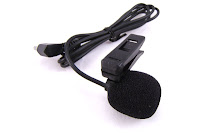
both my video and audio footage to be sharp and professional, I am not using the audio from the camera. Instead I am using a external lapel microphone which records onto an external hard drive. Using a lapel microphone brings a number of benefits to my documentary.
Firstly, Using a lapel microphone means that I am able to obtain high quality audio due to the fact that the audio is taken from a microphone which is only a few inches from the mouth.
The other great advantage of using a lapel mic over the internal microphone of the camera is that no matter where you are in relation to the camera, the audio is always the same quality and level. This has proved great in some of my shots as it means I am able to walk up or into the shot whilst talking and even be extremely far away from the camera, as I will still have perfectly clear audio.
On the other hand however, this perfect audio quality does come at a cost in the editing process.

The Editing

Because of the complex way I have chosen to record my video and audio, it means that a lot more time is needed in the editing process.
The first phases that I have to go through is uploading from the camera and hard drive all the audio and video footage. Once this has been completed, I then concentrate on editing and cleaning up the audio to make it even clearer. To do this, I import the audio into Garage Band(mac) and then tweak both the Equalizer and Speech Enhancer setting until the audio is crisp and free of any background noise.
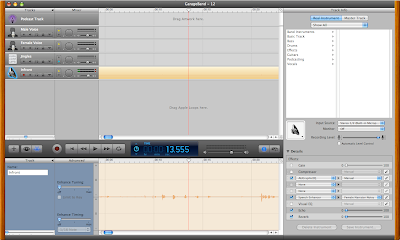
(As show in image on the left)

Once the audio clip is all cleaned up, it is then exported into an MP3 format. This process is repeated to all the audio that is recorded.


Once all the audio has been exported, it is then time to add the audio to the video. Using IMovie I import all the video footage into an event. Then for each clip of video that has been recorded, I have to find the corresponding audio file (which was just exported) and overlay that audio file on top of the audio from the camera. By doing this and movie the audio about, I am able to perfectly sync the two audio tracks (1:Original Audio recorded from the camera mic, 2: The Lapel Mic) and then mute original audio from the camera. This is time consuming as it is often hard to get the two tracks in dead sync with eachother, but with time it is possiable.
Once I have added in and synced the audio, I then treat the video with some lighting effects so make it more effective, and then finally export the file.
This step is repeated until all the video files have been audio syned and exported.

Then finally I import all the new video files into IMovie, and am finally able to edit the files together knowing that they have both perfect sound and video quality.

I'm sure after reading this, you can now see how for just a 10 second clip in the final documentary, it takes hours to film and edit...but I feel that it is worth it for the end result!

Sunday, 5 December 2010

Progress: Cinema Research Scene

Cinema Research Scene:

So, it's taken most of the weekend, but i have finally finished filming the cinema research scene of my documentary. Research plays a key role in my documentary as I believe it is a thoroughly important aspect of a documentary. I want to put the point across that I have "Done my homework" on road safety and I believe this scene helps to show this.

Below is a screenshot of me exporting a clip from the scene. The editing process is extremely long because of the way I have chosen to shoot my documentary (This will be explain in a post later on this week about editing).
I have a lot of editing to-do now...wish me luck!!

Thursday, 2 December 2010

Progress Update

Below is a quick video of me talking about my progress so far, and what I have in store for tomorrow.


Wednesday, 1 December 2010

Documentary - Research Thoughts (1:22 Preview Clip)

Below is the first piece of filming i have done for my documentary, and it will be edited and used in my documentary in a research section of the documentary:

Script For 18 And Driving

Below is a small part of the script for my documentary "18 And Driving". The script has already played a key role in my documentary, and later on in this post I will explain how new and advancing technology has enabled me to really use my script to its full potential.

As you will see from the script below, I used the script more as a running order rather than for what I would say word for word. Although i did have most of my lines in the script, I used it to set out the way I want things to go:
18AndDrivingDocumentaryScript
How technology enabled me to make full use of my script
On of the absolute god gifts I have access to thought the production of my documentary is the Apple Ipad. The Ipad has enabled me to really use my script to the full potential, and it real is clear my BBC programmes have equipped their presenters with one even when they are live on TV (BBC F1 - Jake Humphrey). The Ipad enabled me to have my script in-front of me just seconds before I went in-front of the camera...it was even used as an auto-cue in one of the shots. It also means that because it is connected to the internet, no matter where i am shooting, I always have the latest version of my script with me.
The Ipad has also opened up the opportunities that are there for me, for example...it will be extremely useful, during an interview to play a video to the person i am interviewing on the Ipad to have them comment about what they see. These sorts of things are invaluable!!

Tuesday, 30 November 2010

Planning: My Target Audience

My Target Audience

The audience that my documentary will be aimed at is young drivers ageing from between 17-25. The age group that i am looking to watch my documentary fall between this bracket of 17-25, however i am also aware that my documentary may be something that parents of young drivers wish to watch, either with or without their children. The documentary is not targeted particularly at a certain gender, and is meant for both males and females, but some parts of it will concentrate on male behaviour. I am aware that my documentary has a rather specific target audience, but aim to make it so that anyone who watches my documentary will feel that they have learnt a lesson about road safety.

Monday, 29 November 2010

New 25 word pitch

I know a while back i was asked to write a 25 word pitch for my original idea, which i did, but i thought it might be a good idea, now that i have changed my idea, to come up with a new pitch...so here it is:

"A documentary produced by a young driver, aimed at young drivers to teach them about the dangers when getting behind the wheel of a car."

Exactly 25 words...and exactly the aim of my documentary :)

Thursday, 25 November 2010

Researching My Topic

Researching My Topic
Young Drivers

Research obviously plays a key role in my documentary and over the past few days I have been looking closely into the facts and figures of road safety and young drivers.
To do this I have visited a number of website, but the one which has aided me the most in my research is the DTF (Department For Transport) website. In which I have been able to download and use a number of helpful PDF's.
The DFT releases annually a document called "Reported Road Casualties". But within the document it reveals pretty much all the stats and figures about Britain's Roads, right down the the finer detail.

These PDF documents have been crucial in my research stage and I have taught me so much I didn't know about the road safety and the astonishing figures. It is now my job, to carry out the very hard task of portraying these figures in a way that people will realise the major problems occurring on our roads every day.

Tuesday, 23 November 2010

Research Into Documentaries

Research Into Documentaries

Below I have created a video presentation in which I explain my research into documentaries.
Within the presentation I look at a number of things including:
  • History of Documentaries
  • Codes and Conventions
  • Examples I have looked at
  • Institutions
  • Exhibition and Distribution of documentaries
Please Play Video Below